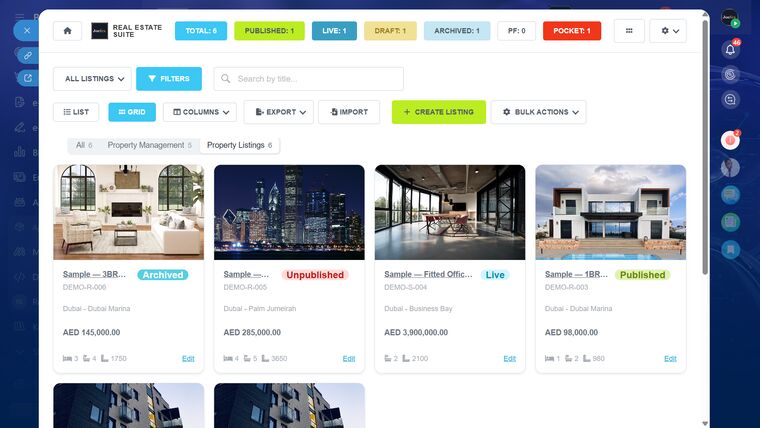
Most Dubai brokerages arrive at Bitrix24 the same way. They have outgrown spreadsheets, they have looked at the property-specific CRMs, and they want one system for sales, marketing and operations rather than three that do not speak to each other. The question they ask us is always some version of: can Bitrix24 actually run a real estate agency?
The honest answer is that Bitrix24 gives you an excellent foundation and none of the property-specific parts. Here is exactly where that line falls.
What Bitrix24 gives you out of the box
A great deal, and it is genuinely good:
- A real CRM. Leads, deals, contacts, companies, pipelines with custom stages, and automation rules on every stage.
- Telephony and WhatsApp. Calls recorded against the contact, WhatsApp conversations logged in the same timeline. For an agency where most of the relationship happens on WhatsApp, this alone justifies the move.
- Tasks and projects. Viewings, follow-ups, document chasing — assigned, deadlined and visible.
- Documents and e-signature. Templates that merge CRM data, sent for signature and stored against the deal.
- Reporting. Pipeline value, conversion by stage, activity by agent.
If your business is "generate leads, work them, close them", Bitrix24 covers it without modification.
What it does not do
Bitrix24 has no concept of a property. It has deals and contacts. That gap is where agencies get stuck, because a real estate business runs on things a generic CRM has never heard of:
- A unit with a reference number, a community, a bedroom count, a size in both sqft and sqm, and a status of its own
- Portal feeds — Property Finder, Bayut and Dubizzle each want a specific XML format, refreshed on a schedule
- Landlords who are not customers, with management fees, IBANs and quarterly statements
- Tenancy contracts with renewal dates, arrears and Ejari registration
- Maintenance jobs dispatched to technicians who will never have a CRM licence
You can force some of this into Bitrix24 with custom fields and Smart Processes. Plenty of agencies do. It works until the day you need a portal feed or an owner statement, and then it does not.
The three ways agencies close the gap
1. Custom fields and Smart Processes
Cheapest and quickest. You model properties as a Smart Process, add the fields you need, and accept that portal syndication and owner accounting will be manual. Fine for a small sales-only brokerage with under a hundred listings. It stops scaling the moment you take on property management.
2. A separate property system alongside Bitrix24
You buy a dedicated real estate platform for listings and keep Bitrix24 for CRM. Now you have two systems and an integration to maintain, and your agents have two logins and two places to check. We have migrated several agencies away from this arrangement.
3. A property layer built inside Bitrix24
Properties, owners, tenancies and work orders live inside the portal your team already opens each morning, using the same permissions, the same activity stream and the same reporting. This is the approach behind our Real Estate Suite — 22 modules that add the property half without moving your CRM anywhere.
What to decide before you commit
Whichever route you take, settle these first — they are the questions that determine whether the project succeeds:
- Do you manage property, or only sell it? Sales-only agencies can live in stock Bitrix24 far longer. The moment you hold keys and collect rent, you need tenancy, arrears and owner payouts.
- Which portals do you advertise on, and who owns the advertiser accounts? The feed must be registered against your own Property Finder and Bayut accounts, not a vendor's.
- Do you need Arabic? Not bilingual fields — a genuine right-to-left interface. Retrofitting this later is expensive.
- How many people need a licence? Technicians and external contractors should not need CRM seats. If a proposal has you buying licences for plumbers, question it.
- Who owns the data if you leave? Ask for the answer in writing.
A realistic timeline
For a 20 to 50 agent brokerage, a properly run implementation takes four to six weeks: a week of workflow mapping, two to three weeks of configuration and data migration, a week of training, then 90 days of adjustment while people actually use it. Anyone promising a week has not done your data migration.
If you want a straight assessment of which route suits your agency, book a free 45-minute audit. We will tell you if stock Bitrix24 is enough — that answer costs you nothing and saves us both time.